Impulse moments
Spending takes a few seconds. Saving takes a decision you have to keep making — and it’s easy to put off.
Now available on iOS & Android
Build better money habits with TimeVault. Set aside funds, choose your saving duration, and stay committed to your financial goals.
Illustrative interface · sample data
The problem
When money sits one tap away, good intentions compete with every impulse, every sale and every “just this once.” Most of us don’t need another chart of where our money went. We need a little distance between our savings and the moment.
Spending takes a few seconds. Saving takes a decision you have to keep making — and it’s easy to put off.
Savings that sit next to everyday spending are easy to dip into, even when they’re meant for rent or a goal.
Budgeting tools show what already happened. They don’t always help you commit to what happens next.
TimeVault adds structure: decide once, lock it in, and let the timer do the remembering.
Meet TimeVaultIntroducing TimeVault
TimeVault is a time-locked savings wallet. You decide how much to set aside and for how long — then the app keeps it out of reach until your hold period ends.
Add funds with your card and withdraw to your linked bank account once the hold ends. TimeVault isn’t a bank, and it doesn’t decide how you spend.
Choose the amount and the hold period for every Lock, and run separate Locks for rent, textbooks, a trip or a night out.
Once a Lock starts, its timer can’t be changed or cancelled. That’s the point: you make the decision once, in a calm moment.
Core features
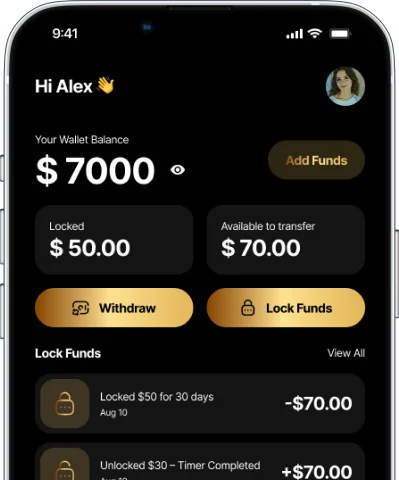
Lock funds safely with a timer. Choose an amount and a hold period, add more over time, and the balance stays out of reach until the timer ends — even when the app is closed.
App screen shown with sample data.
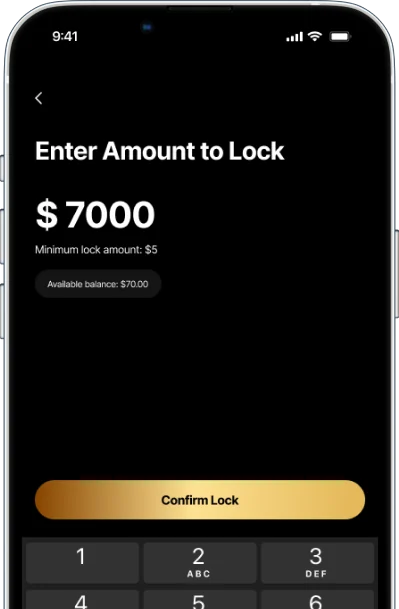
Add funds with your card through Stripe. When the hold period ends, withdraw to your linked bank account.
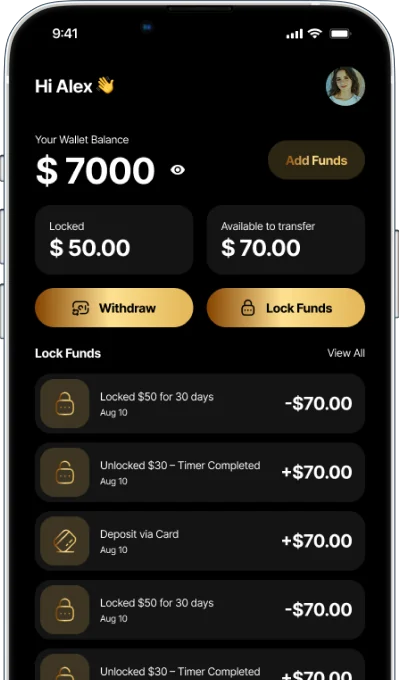
Track your savings journey in one clear ledger: every deposit, lock, unlock and withdrawal.
Transparent protection, built on established providers — and clear about what TimeVault is and isn’t.
TimeVault is not a bank. No system is 100% secure — read our Privacy Policy.
We’re building reward-based incentives through ad integrations — for example, ad-supported early unlocks where permitted. Conditions may be limited per lock cycle and may not be available in every region.
*Where available. Details may change before release. See Terms §5.
How TimeVault works
Download TimeVault from the App Store or Google Play and set up your profile. You’ll need to be 18 or older (or the legal age where you live).
Connect an eligible payment method and deposit funds, subject to supported availability. Card payments are processed through Stripe.
Pick how much to lock and how long to hold it. Once your Lock starts, the timer can’t be changed or cancelled — that’s what makes the commitment work.
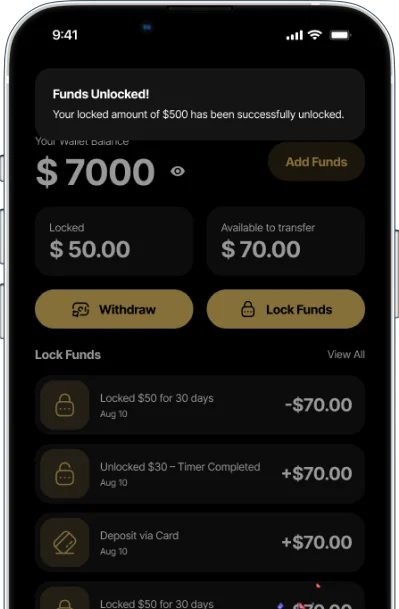
When the hold period ends, TimeVault can notify you, and your funds become available according to the app’s terms — ready to withdraw to your linked bank account.
See the full flow in under a minute.
Inside the app
Tap through the key screens — from your dashboard to the moment you choose a hold period.
Your Wallet Balance
$1,240.00
Add FundsEnter Amount to Lock
$250
Available balance: $390.00Choose Hold Period
Locking $250 · Textbooks
Once confirmed, this Lock can’t be changed or cancelled.
Confirm LockTransaction History
Settings
Account
Security & alerts
Illustrative interface · sample data. Screens may differ from the current app.
From the app
Dashboard, Lock Funds and the unlock alert you see when a timer completes. Download the app for the current version.
Why TimeVault
TimeVault is designed to make saving feel deliberate, not difficult. Here’s what it’s built to help you do.
Make setting money aside a routine, not a decision you have to win every day.
Money in a Lock isn’t available for the next impulse purchase.
Separate Locks for separate goals, each with its own timeline.
A clear ledger of every deposit, lock, unlock and withdrawal.
Decide once, calmly, and let the timer hold you to it.

“No complicated investing. No distractions. Just intentional saving — made effortless.”
The TimeVault mission
For investors
TimeVault is building behavior-driven saving tools that help people save consistently. If you invest in fintech and financial wellness, we’d like to talk.
Market opportunity
Positioned at the intersection of four growing categories, TimeVault focuses on people who want structure in their finances rather than another budgeting dashboard.
Business model Planned
Our planned model combines advertising with a premium tier.
Product roadmap
Core saving features built and released on iOS and Android (v1.0, September 2026).
Public launch with social campaigns and referral-driven adoption.
Ad revenue expands and premium subscriptions begin.
AI features roll out as the product enters new markets.
Growth strategy
Investor relations
We share market sizing, traction and financial information directly with interested investors.
This website is for information only and is not an offer to sell, or a solicitation of an offer to buy, any securities. Roadmap items are forward-looking plans and may change.
FAQ
Straight answers about how TimeVault works. For anything about your own account, get in touch.
Add funds with your card, choose an amount to lock and a hold period, and the money stays locked until the timer ends. When the hold period is over, you can withdraw to your linked bank account.
You choose the hold period when you create a Lock. The timer can’t be changed once the Lock is created, so pick a period that matches your goal. You can run separate Locks for different goals.
Locks are designed to stay locked until their scheduled end time, and a Lock can’t be cancelled once it has started. Where the app offers it, early unlock may be available under specific in-app conditions, such as viewing advertisements. These conditions may be limited per lock cycle and aren’t available in all regions. See Terms & Conditions §5.
Any price or fees are shown on the App Store or Google Play listing and in the app before you confirm. Card payments are processed by Stripe and are subject to Stripe’s terms. TimeVault doesn’t offer interest or guaranteed returns on locked funds.
TimeVault is on the App Store and Google Play. Availability of the app and of individual features, such as early unlock, can vary by country and by what our payment providers support. Check the store listing in your region.
Download TimeVault, create your account and follow the in-app steps to add a payment method. You must be at least 18 (or the legal age in your jurisdiction) and provide accurate information.
Yes. TimeVault Wallet can be downloaded from the App Store and Google Play. We’re continuing to improve it, and features on this site that aren’t live yet are clearly labeled “Planned.”
The waitlist is how we share launch news, including new regions and new features, plus product updates. Joining doesn’t create an app account or move any money. To be removed, email info@timevaultapp.co.
No. TimeVault is a digital wallet application designed to help you build financial discipline. It is not a bank and does not provide traditional banking services.

Be among the first to hear about TimeVault’s launch and product updates.
Ready to start now? TimeVault is available on iOS and Android.
TimeVault waitlist
Be among the first to hear about TimeVault’s launch and product updates.
Investor relations
Request the investor deck or ask for a meeting. We’ll reply by email.